
IES FAQ Answers
VisualAnalysis Levels
VisualAnalysis comes in four feature-levels. You may change to a higher level at any time after your initial purchase. After changing your feature level, you will be issued a new License ID. To use it, deactivate your existing license and then activate the new license.
| Simple Analysis | 2D Design | Full Design | Advanced |
|---|---|---|---|
| 3D static and dynamic analysis only. | Basic static analysis and design of beams, columns, plane frames and trusses (i.e. two-dimensional models). Steel and wood specification design checks included. | 3D models with static and dynamic analysis, plus design checks for steel, wood, concrete, cold-formed, and aluminum materials. | Adds, automatic plate meshing, rigid links, time history, moving loads, cable elements, and more... |
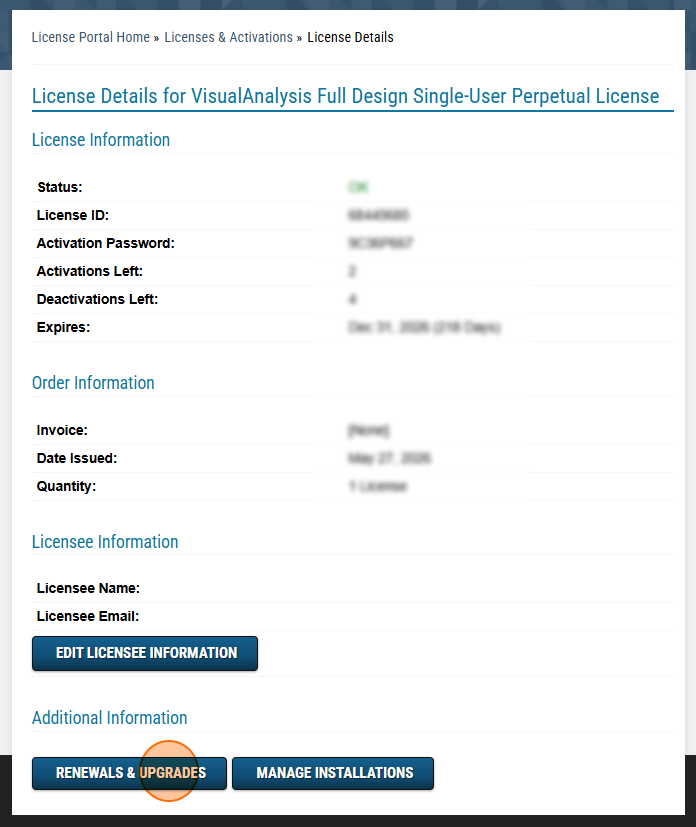
If you would like to change the level of your VisualAnalysis license (e.g. Full Design to Advanced), you can purchase the upgrade directly through the Customer License Portal by navigating to the License Details page and selecting Renewals and Upgrades. If you have a subscription license, you must simply purchase a new subscription at the appropriate level, and you can disable the payment plan and let it expire. We can also pro-rate a discount if you have an existing subscription. In this instance, please Contact Sales for assistance.
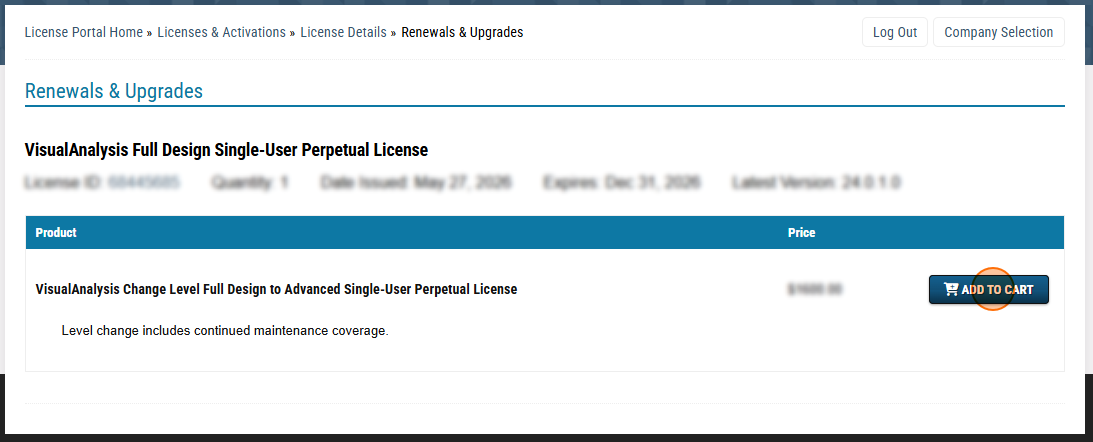
A level-change is not normal maintenance, even though it appears in the Renewals and Upgrades section of the shopping system. If you have any questions or concerns, please Contact Sales before making this purchase.