
IES VisualFoundation User's Guide
Analysis
VisualFoundation uses finite element analysis (FEA) to determine the displacements, shears, and moments in your structure. Exporting the model as a VisualAnalysis project (File | Export a VA Project) will allow you get a better sense of what VisualFoundation is doing behind the scenes. VisualFoundation attempts to handle many of the details of FEA for you. However, some knowledge of FEA is still required to use the program successfully.
To control the number of plate elements you can pick between: course, medium, fine, or specify a desired number directly. The meshing algorithm takes this request into consideration along with the project geometry and other constraints when generating the mesh. The actual number of plates may not reflect your request very closely. You can view the plate mesh by turning on Meshed Plates in the Filter of the Project Manager.
For advanced finite element meshing control there are options available. Generally you can ignore these, but they might be used to help with meshing 'issues' that arise. One that may come in handy in VisualFoundation is the segment length override that can help you tame a wild or complex mesh near beams, line supports, or adjacent slab boundaries.
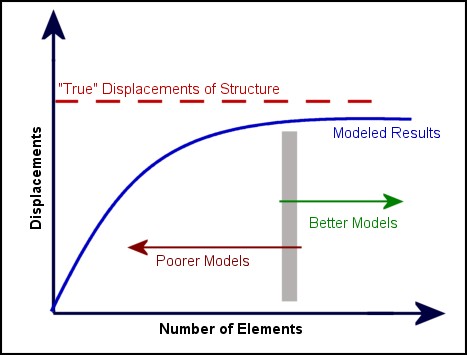
Finite element analysis is inherently approximate. To insure your analysis results are accurate you should follow a mesh refinement technique, which is outlined below. The goal is to get accurate results, without spending hours waiting for results. Generally you use a coarse mesh to get fast preliminary results, and then use finer meshes for final results.
The bending part of the FEA plate element is based on the triangle formulation originally presented by Xu et. al.1 in 1992. This element accounts for transverse shear effects present in structures that might contain areas with thick plates, such as footings or thick floor slabs.
A statics check is made for each load case analyzed. You can see the check in a Report View, or view the check in the tab of .
The total applied force and moment in each coordinate direction is calculated. During the calculation loads are applied on the deflected shape of the structure. A comparison is made against the sum of all support reactions. If the structure is in equilibrium, the values are equal and opposite. An imbalance usually indicates displacements too large for a first order FEA analysis. The large displacements may result from modeling problem or (rarely) a software defect.
If there is a significant imbalance, VisualFoundation warns you about the condition. The warning threshold for the imbalance is arbitrarily set. If you get this warning message, you will need to use your best judgment after inspecting the check differences, your model, and results carefully. Just because there is a warning does not mean there is a problem. You should check to see if displacements and forces in your model are "reasonable" and "expected". A large force imbalance, either in percentage or in absolute value is a problem that cannot be ignored.